TRNSED and TRNSHELL 3.0
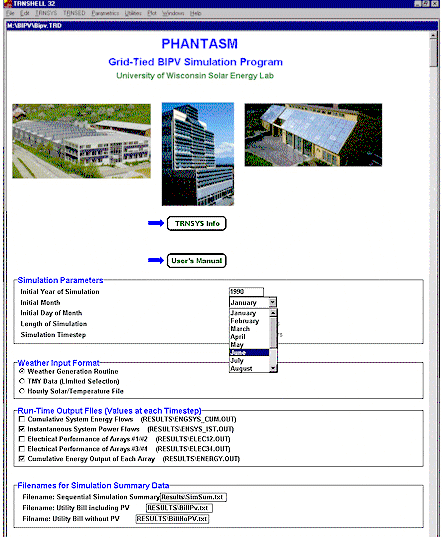
TRNSHELL is the non-graphical interface for creating and editing TRNSYS input files. It provides users with an environment in which they can create TRNSED packages; user friendly stand alone TRNSYS simulations that can be distributed freely or sold by contract with the TRNSYS developers.
Right Click Functionality: Lines in the TRNSYS input file can be commented out by highlighting them and then right clicking.
Groups: A series of TRNSED commands can be grouped together, which makes two things possible. First, grouped lined appear encircled by a box in the TRNSED window for clarity. Second, groups are assigned a name and can be controlled (turned "on" and "off") by use of radio buttons and check boxes.
Radio Buttons: A special type of group, radio buttons allow the user to turn on and off parts of a TRNSYS simulation by commenting then in and out. Radio buttons allow users to select one of a group of options.
Check Boxes: Very similar to radio buttons except that users can choose multiple options at once.
Application Links: Buttons can be added to a TRNED input screen that call and run external applications.
Help Buttons: Buttons at the end of any TRNSED line allow the user to call up HTML based help screens.

Solar Energy Laboratory -- University of Wisconsin - Madison